
Music Spectrograph1.9.5 - App Store
You'll be able to see results in few seconds.
Publisher Description

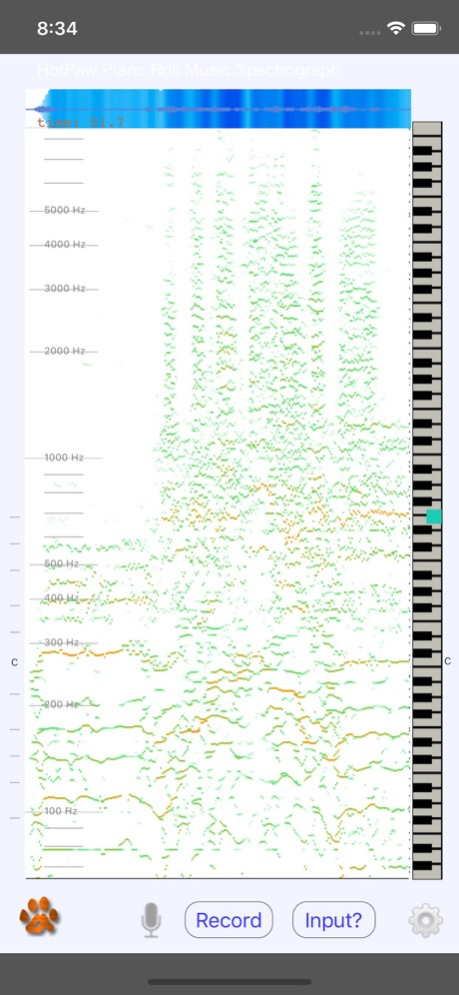
Music Spectrograph allows you to visually reverse engineer sound and music, in real-time. See a live MIDI piano roll showing pitch and frequency. When playing music files, you can slow down, and even stop sound in time.
Music Spectrograph is being using in college music programs to aid in learning music transcription.
The Hotpaw Music Spectrograph presents a high-resolution scrolling spectrogram as you listen, so that you can see these patterns in sound and music, as well as how sound corresponds to notes on a piano keyboard. This piano alignment makes it far easier to spot which frequencies in sounds correspond to which musical notes.
Features include:
- 12th-octave MIDI-pitch-centered spectrograph (also called a sonogram)
- Usable with live audio, tunes from your iOS device's music library, or a file downloaded via a URL (web address)
- Records up to a 4 minute spectrograph history you can stop, scroll back and review
- Slow Down music files by up to 8X, or speed music up by 3X to skip sections faster
- Stop music in time, and still hear the music frequencies present via re-synthesis (scroll back a little in time to bring up the ReSynth switch).
- Play tunes in mono, left or right channel only, or with center-panned vocals reduced
- Color the pitch graph to see if notes are in-tune or out-of-tune
- Color the spectrograph for loudness, or graph in black-and-white or with Pastel colors
- Mid-pitch filtering to remove some of the higher overtones
Use the Input? button to select a tune from your library (DRM protected iTunes files not supported). Use the Gear button to select among several viewing modes. There's a volume control to manually set the sensitivity threshold. Stop playing or recording to scroll back and review or resynthesize sound. Touch the keyboard during resynthesis to isolate one note.
For many musical sounds, this app will show you many overtones and harmonics, not just the fundamental pitch of notes. Some musical experience is required to tell musical notes from their overtones and harmonic frequencies.
Version History Bug fixes and stability improvements. 1.9.5 10/05/2023 Bug fixes for iPad graphics and music library selection issues 1.9.3 05/14/2020 Bug fixes to better support newer iOS devices 1.9.2 04/15/2020 Updated for iOS 11 and the iPhone X 1.9.1 11/17/2017 Updated for iOS 11. Improved support for AirPods. Bug fixes and performance enhancements. 1.8.4 10/05/2017 Bug fix to allow working with AirPods. 1.8.3 06/28/2017 Bug fix for misplaced controls.
New in Prior Version 1.8.1 :
Music Spectrograph can now download an audio or music file from an entered URL for spectrogram visualization.
The rate control for slowing down music has been renamed the Playing Speed control.
Temporary recording of the last one minute of audio input for replay analysis was added.
This update also includes a few bug fixes and enhancements for iOS 10.
Music Spectrograph will now request permission to access your iTunes Media Library. Please grant permission if you wish the app to be able to play, analyze, and visualize spectrographs of that music.
Thank you for trying our app! If you find the Music Spectrograph app useful, we would greatly appreciate if you took the time to write a thoughtful review. App Store ratings and review are very helpful in encouraging continued development 1.8.2 11/03/2016 Music Spectrograph can now download an audio or music file from an entered URL for spectrogram visualization.
The rate control for slowing down music has been renamed the Playing Speed control.
Temporary recording of the last one minute of audio input for replay analysis was added.
This update also includes a few bug fixes and enhancements for iOS 10.
Music Spectrograph will now request permission to access your iTunes Media Library. Please grant permission if you wish the app to be able to play, analyze, and visualize spectrographs of that music.
Thank you for trying our app! If you find the Music Spectrograph app useful, we would greatly appreciate if you took the time to write a thoughtful review. App Store ratings and review are very helpful in encouraging continued development. 1.8.1 10/31/2016 This version includes bug fixes for running on the newest iPad devices.
If you find our Music Spectrograph app useful, please take the time to give us a nice review. It really helps.
Helpful hint: You can lock rotation on an iPad to put the piano keyboard at the bottom. 1.7.4 11/13/2015 Bug fixes for 48 kHz audio sample rates and the new iPhone 6s and 6s Plus. 1.7.3 10/28/2015 Bug fixes for iOS 9.
Enhancements for the new faster iPhone 6s audio sample rates. 1.7.2 10/06/2015 Improved "stopped-in-time" super slowdown re-synthesis.
Updated for iOS 8.4 and newer. 1.7.1 09/10/2015 Added support for iPhone 6 and 6 Plus display sizes.
Improved the visibility of the settings and controls user interface.
Bug fix for elapsed time indicator when converting or playing mono mp3 files. 1.6.0 11/11/2014 Updated for iOS 7. 1.5.0 10/02/2013 Version 1.4.2:
- Improved amplitude & spectral flux graph.
- Bug fixes for the elapsed time indicator, AGC, vanishing iPad controls, and a memory leak.
Also from Previous Version 1.4.0
- Added a new light-colored "Pastel mode" graph option.
- Improved "Slow-Down" music play rate control.
- Improved "Stopped-in-Time" Pitch Resynthesis.
- Improved Mid-pitch overtone filtering.
- New Icon! 1.4.2 08/13/2013 - Added a new light-colored Pastel mode graph option
- Improved "Slow-Down" music play rate control
- Improved "Stopped-in-Time" Pitch Resynthesis
- Improved Mid-pitch overtone filtering
- New Icon
- Also includes several User Interface enhancements and Bug Fixes 1.4.0 07/31/2013 Fixed a bug that caused distortion of microphone audio input.
Fixed a bug with scrolling back through spectrograph history.
Added: Now you can Open a .WAV file Mail attachment in the Music Spectrograph app, and can play it via the Song button. 1.3.6 06/24/2013 New in 1.3.5: Fixes a missing background image on the iPad.
And new from the previous update to 1.3.4:
- Adds time stretching capability to slow down music (from your iTunes library) by up to 5 times slower without changing the pitch (iOS 6 or later required to enable this feature.).
- Adds a control for Mono, Left-only, Right-only, and Center-subtract (L-R) to Song playback. Center-subtract helps remove vocals from many common recording mixes.
- Also includes some minor bug fixes. 1.3.5 06/07/2013 Version 1.3.4:
- Adds time stretching capability to slow down music (from your iTunes library) by up to 5 times slower without changing the pitch (iOS 6 or later required to enable this feature. This is not a high audio quality speed adjustment. This is just to help slow things down to aid in music transcription.).
- Adds a control for Mono, Left-only, Right-only, and Center-subtract (L-R) to Song playback. Center-subtract helps remove vocals from many common recording mixes.
- Also includes some minor bug fixes. 1.3.4 06/04/2013 New in version 1.3.0:
The spectrogram is now displayed with 4X higher resolution when paused in the Volume and B&W coloring modes.
Keyboard synthesis was added to the ReSynth mode to isolate hearing 1 pitch in the MIDI spectrum.
The ability to paste audio into song player was added.
Also: Fixed some issues with the Volume setting, the AGC, and Song selection. 1.3.0 04/11/2013 Introducing Music Spectrograph 1.2.0
Now with a new re-synthesis mode to "stop music in time" (a synthetic vocoder recreation of the detected MIDI pitches and overtones.) The ReSynth button to enable this feature will appear after scrolling back in the MIDI history.
The app has also been updated for new devices (iOS6 and the iPhone 5 display).
Also:
Improved the MIDI frequency band filters for better contrast and accuracy.
Added some visual frequency grid marks.
Fixed a bug in phone call interruption behavior.
Enjoy, and please leave ratings and reviews if you want to support further updates to this app.
Version 1.2.1
This update should address a problem with a crash-on-launch that some users experienced with the previous update. 1.2.1 03/14/2013 *** Do not download for use on iPads. A bug fix for a crash on launch has been sent to Apple. ***
New:
Added a new re-synthesis mode to "stop music in time" (actually a slightly robotic vocoder-like version of the major MIDI overtones and pitches.) The ReSynth button will appear after scrolling back in MIDI history.
Also:
Updated for new devices (iOS6 and the iPhone 5 display).
Improved the MIDI frequency band filters for better contrast and accuracy.
Added some visual frequency grid marks.
Fixed a bug in phone call interruption behavior. 1.2.0 03/07/2013 Bug fix for iOS 5 and analyzing music from your iTunes library. 1.1.5 10/28/2011 Added the capability to spectrograph analyze music from the iTunes Library, as well as mic input.
Fixed the support email link on iPad. 1.1.2 05/29/2011 1.0.0 04/20/2011
About Music Spectrograph
The company that develops Music Spectrograph is Ronald Nicholson. The latest version released by its developer is 1.9.5.
To install Music Spectrograph on your iOS device, just click the green Continue To App button above to start the installation process. The app is listed on our website since 2026-10-14 and was downloaded 0 times. We have already checked if the download link is safe, however for your own protection we recommend that you scan the downloaded app with your antivirus. Your antivirus may detect the Music Spectrograph as malware if the download link is broken.
How to install Music Spectrograph on your iOS device:
- Click on the Continue To App button on our website. This will redirect you to the App Store.
- Once the Music Spectrograph is shown in the iTunes listing of your iOS device, you can start its download and installation. Tap on the GET button to the right of the app to start downloading it.
- If you are not logged-in the iOS appstore app, you'll be prompted for your your Apple ID and/or password.
- After Music Spectrograph is downloaded, you'll see an INSTALL button to the right. Tap on it to start the actual installation of the iOS app.
- Once installation is finished you can tap on the OPEN button to start it. Its icon will also be added to your device home screen.
Program Details
System requirements
Download information
Pricing
Version History
version 1.9.5
posted on 2026-10-14
Version History Bug fixes and stability improvements. 1.9.5 10/05/2023 Bug fixes for iPad graphics and music library selection issues 1.9.3 05/14/2020 Bug fixes to better support newer iOS devices 1.9.2 04/15/2020 Updated for iOS 11 and the iPhone X 1.9.1 11/17/2017 Updated for iOS 11. Improved support for AirPods. Bug fixes and performance enhancements. 1.8.4 10/05/2017 Bug fix to allow working with AirPods. 1.8.3 06/28/2017 Bug fix for misplaced controls.
New in Prior Version 1.8.1 :
Music Spectrograph can now download an audio or music file from an entered URL for spectrogram visualization.
The rate control for slowing down music has been renamed the Playing Speed control.
Temporary recording of the last one minute of audio input for replay analysis was added.
This update also includes a few bug fixes and enhancements for iOS 10.
Music Spectrograph will now request permission to access your iTunes Media Library. Please grant permission if you wish the app to be able to play, analyze, and visualize spectrographs of that music.
Thank you for trying our app! If you find the Music Spectrograph app useful, we would greatly appreciate if you took the time to write a thoughtful review. App Store ratings and review are very helpful in encouraging continued development 1.8.2 11/03/2016 Music Spectrograph can now download an audio or music file from an entered URL for spectrogram visualization.
The rate control for slowing down music has been renamed the Playing Speed control.
Temporary recording of the last one minute of audio input for replay analysis was added.
This update also includes a few bug fixes and enhancements for iOS 10.
Music Spectrograph will now request permission to access your iTunes Media Library. Please grant permission if you wish the app to be able to play, analyze, and visualize spectrographs of that music.
Thank you for trying our app! If you find the Music Spectrograph app useful, we would greatly appreciate if you took the time to write a thoughtful review. App Store ratings and review are very helpful in encouraging continued development. 1.8.1 10/31/2016 This version includes bug fixes for running on the newest iPad devices.
If you find our Music Spectrograph app useful, please take the time to give us a nice review. It really helps.
Helpful hint: You can lock rotation on an iPad to put the piano keyboard at the bottom. 1.7.4 11/13/2015 Bug fixes for 48 kHz audio sample rates and the new iPhone 6s and 6s Plus. 1.7.3 10/28/2015 Bug fixes for iOS 9.
Enhancements for the new faster iPhone 6s audio sample rates. 1.7.2 10/06/2015 Improved "stopped-in-time" super slowdown re-synthesis.
Updated for iOS 8.4 and newer. 1.7.1 09/10/2015 Added support for iPhone 6 and 6 Plus display sizes.
Improved the visibility of the settings and controls user interface.
Bug fix for elapsed time indicator when converting or playing mono mp3 files. 1.6.0 11/11/2014 Updated for iOS 7. 1.5.0 10/02/2013 Version 1.4.2:
- Improved amplitude & spectral flux graph.
- Bug fixes for the elapsed time indicator, AGC, vanishing iPad controls, and a memory leak.
Also from Previous Version 1.4.0
- Added a new light-colored "Pastel mode" graph option.
- Improved "Slow-Down" music play rate control.
- Improved "Stopped-in-Time" Pitch Resynthesis.
- Improved Mid-pitch overtone filtering.
- New Icon! 1.4.2 08/13/2013 - Added a new light-colored Pastel mode graph option
- Improved "Slow-Down" music play rate control
- Improved "Stopped-in-Time" Pitch Resynthesis
- Improved Mid-pitch overtone filtering
- New Icon
- Also includes several User Interface enhancements and Bug Fixes 1.4.0 07/31/2013 Fixed a bug that caused distortion of microphone audio input.
Fixed a bug with scrolling back through spectrograph history.
Added: Now you can Open a .WAV file Mail attachment in the Music Spectrograph app, and can play it via the Song button. 1.3.6 06/24/2013 New in 1.3.5: Fixes a missing background image on the iPad.
And new from the previous update to 1.3.4:
- Adds time stretching capability to slow down music (from your iTunes library) by up to 5 times slower without changing the pitch (iOS 6 or later required to enable this feature.).
- Adds a control for Mono, Left-only, Right-only, and Center-subtract (L-R) to Song playback. Center-subtract helps remove vocals from many common recording mixes.
- Also includes some minor bug fixes. 1.3.5 06/07/2013 Version 1.3.4:
- Adds time stretching capability to slow down music (from your iTunes library) by up to 5 times slower without changing the pitch (iOS 6 or later required to enable this feature. This is not a high audio quality speed adjustment. This is just to help slow things down to aid in music transcription.).
- Adds a control for Mono, Left-only, Right-only, and Center-subtract (L-R) to Song playback. Center-subtract helps remove vocals from many common recording mixes.
- Also includes some minor bug fixes. 1.3.4 06/04/2013 New in version 1.3.0:
The spectrogram is now displayed with 4X higher resolution when paused in the Volume and B&W coloring modes.
Keyboard synthesis was added to the ReSynth mode to isolate hearing 1 pitch in the MIDI spectrum.
The ability to paste audio into song player was added.
Also: Fixed some issues with the Volume setting, the AGC, and Song selection. 1.3.0 04/11/2013 Introducing Music Spectrograph 1.2.0
Now with a new re-synthesis mode to "stop music in time" (a synthetic vocoder recreation of the detected MIDI pitches and overtones.) The ReSynth button to enable this feature will appear after scrolling back in the MIDI history.
The app has also been updated for new devices (iOS6 and the iPhone 5 display).
Also:
Improved the MIDI frequency band filters for better contrast and accuracy.
Added some visual frequency grid marks.
Fixed a bug in phone call interruption behavior.
Enjoy, and please leave ratings and reviews if you want to support further updates to this app.
Version 1.2.1
This update should address a problem with a crash-on-launch that some users experienced with the previous update. 1.2.1 03/14/2013 *** Do not download for use on iPads. A bug fix for a crash on launch has been sent to Apple. ***
New:
Added a new re-synthesis mode to "stop music in time" (actually a slightly robotic vocoder-like version of the major MIDI overtones and pitches.) The ReSynth button will appear after scrolling back in MIDI history.
Also:
Updated for new devices (iOS6 and the iPhone 5 display).
Improved the MIDI frequency band filters for better contrast and accuracy.
Added some visual frequency grid marks.
Fixed a bug in phone call interruption behavior. 1.2.0 03/07/2013 Bug fix for iOS 5 and analyzing music from your iTunes library. 1.1.5 10/28/2011 Added the capability to spectrograph analyze music from the iTunes Library, as well as mic input.
Fixed the support email link on iPad. 1.1.2 05/29/2011 1.0.0 04/20/2011
version 1.9.5
posted on 2023-10-05
Bug fixes and stability improvements.
version 1.9.5
posted on 2023-10-05
Oct 5, 2023
Version 1.9.5
Bug fixes and stability improvements.
version 1.9.3
posted on 2020-05-14
May 14, 2020 Version 1.9.3
Bug fixes for iPad graphics and music library selection issues
version 1.9.3
posted on 2020-05-14
14 May 2020 Version 1.9.3
Bug fixes for iPad graphics and music library selection issues
version 1.9.2
posted on 2020-04-15
Apr 15, 2020 Version 1.9.2
Bug fixes to better support newer iOS devices
version 1.9.1
posted on 2017-11-17
Nov 17, 2017 Version 1.9.1
Updated for iOS 11 and the iPhone X
version 1.7.4
posted on 2011-04-22
version 1.9.1
posted on 1970-01-01
17 нояб. 2017 г. Version 1.9.1
Updated for iOS 11 and the iPhone X
version 1.9.3
posted on 1970-01-01
2020년 5월 14일 Version 1.9.3
Bug fixes for iPad graphics and music library selection issues
Disclaimer
Official App Store Link
We do not host Music Spectrograph on our servers. We did not scan it for viruses, adware, spyware or other type of malware. This app is hosted by Apple and passed their terms and conditions to be listed there. We recommend caution when installing it.
The App Store link for Music Spectrograph is provided to you by apps112.com without any warranties, representations or guarantees of any kind, so access it at your own risk.
If you have questions regarding this particular app contact the publisher directly. For questions about the functionalities of apps112.com contact us.
